2. Assets Structure
There are three main data assets: - data: for page content management and configuration - images, I won’t cover this here since it is straightforward to understand. - sass: for styling
2.1. Data Assets
frontend/assets/data/
├── modelData.json        # 3D model configs and waveform data, used in model component
├── landingPageData.json  # Landing page content, used in landing page
├── supportData.json      # Support services info, used in support-services page
└── topics.json           # Educational content structure
Model Configuration
The modelData.json file contains comprehensive configurations for 3D models and their associated data:
The first model is the default model, following this format to add more models by just using data, and the interface will be updated automatically.
"models": [
    {
    "model": "normal",
    "modelName": "Normal",
    "Description": "Normal Placenta",
    "color": "error",
    "config": {
        "path": "/model/normal.vtk",
        "displayName": "Normal Placenta",
        "color": 16716066,
        "opacity": 1.0,
        "modelSize": 420,
        "useCylinderGeometry": true,
        "cylinderSegments": 10
    },
    "waveform": {
        "xAxis": "Time (s)",
        "xDataPath": "/waveforms/normal/time.csv",
        "yAxis": "Velocity",
        "lineTitle": "Normal",
        "yDataPath": "/waveforms/normal/signal.csv",
        "waveformImg": "/img/normal-ultrasound.jpg", // image above the waveform
        "title": "Umbilical artery blood flow velocity (Normal)", // title of the waveform
        "isPlaying": true, // whether the waveform is playing
        "speed": 1, // speed of the waveform
        "waveformNote":"* Normal Ultrasound Image",
        "description": "Blood flow characteristics in the umbilical cord can reflect the health of the fetus",
        "colors": {
          "normal": "#4CAF50", // color for the line for normal mode
          "colorblind": "#2196F3" // color for the line for colorblind mode
        },
        "timeOffset": 1.45
    }
    },

]
See the image below for the model confign and the elements on the page (note the model used here might be different from the current model), you can also refer to the display model document for more details.
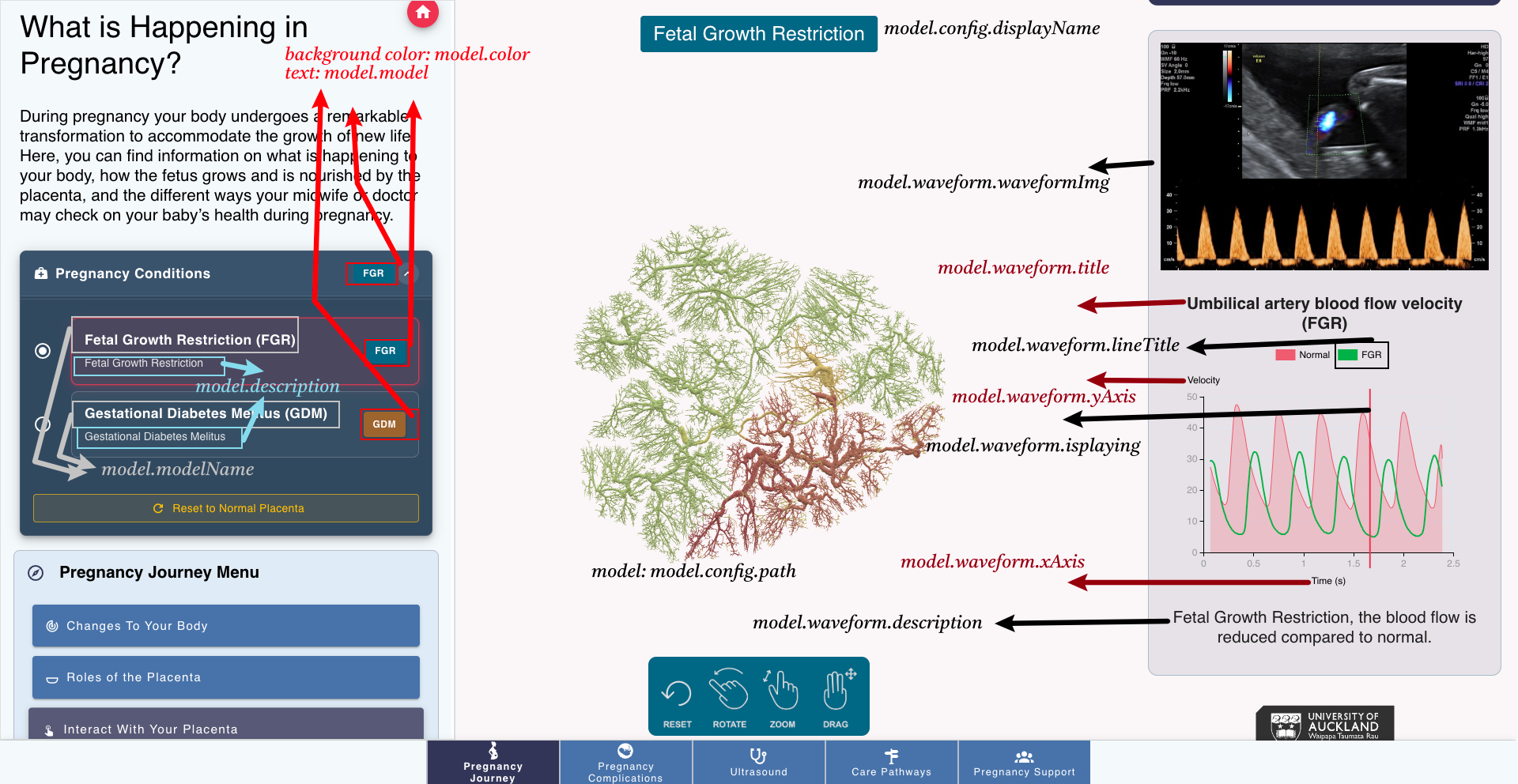
Below is the explanation of the key:value pairs:
The modelData.json file contains configuration for 3D medical models. Here are the key:value pairs:
models: Array containing all medical model configurations
model: Unique identifier for the model (normal, FGR, GDM), displayed as the tag for the condition selector
modelName: Display name for the model
Description: Brief description of the medical condition
color: The background color of the tag for the condition selector
- config: Model visualization settings
path: Path to VTK 3D model file
displayName: Name shown in the interface
color: RGB color value for the model, if no flux/pressure color, this color will be used
opacity: Transparency level (0.0-1.0)
modelSize: Size of the 3D model
useCylinderGeometry: Whether to use cylinder geometry
cylinderSegments: Number of cylinder segments
defaultRotationY: Default Y-axis rotation since some models are not facing the camera defaultly
- waveform: Blood flow data configuration
xAxis: X-axis label for the chart
xDataPath: Path to time data CSV file
yAxis: Y-axis label for the chart
yDataPath: Path to velocity data CSV file
lineTitle: Title for the waveform line at the legend
title: Chart title
waveformImg: Path to ultrasound image
isPlaying: Whether animation of playhead starts playing
speed: Animation playback speed
waveformNote: Note displayed with the image
description: Medical description of the condition
colors: Color scheme of the line for normal and colorblind users
timeOffset: Time offset for data synchronization, so that the heart beat waveform is aligned
Landing Page Configuration
The landingPageData.json file contains the configuration for the landing page:
"title": "Pregnancy is an exciting time!",
"description": "Nau mai, haere mai! Whether you're experiencing a smooth pregnancy or navigating unexpected challenges, this app is here to support you and your whānau every step of the way. Designed especially for people in Aotearoa New Zealand, we offer trusted information, helpful tools, and guidance to help you understand your health and make confident decisions.",
"items": [
  {
    "index": 0,
    "title": "What is happening in pregnancy?",
    "description": "Information on how your body changes to support your babys growth during pregnancy, and how your midwife/doctor will track the health of you and your baby.",
    "image": "/img/landing/pregnancy.svg",
    "backgroundColor": "#7A3520",
    "link": "/pregnancy-changes"
  },
  {
    "index": 3,
    "title": "Navigating pregnancy complications",
    "description": "What you need to know about why complications occur, how they are detected, and what this may mean for your pregnancy journey and beyond.",
    "image": "/img/landing/embryo_icon.svg",
    "backgroundColor": "#313657",
    "link": "/complications-fetal"
  },
]
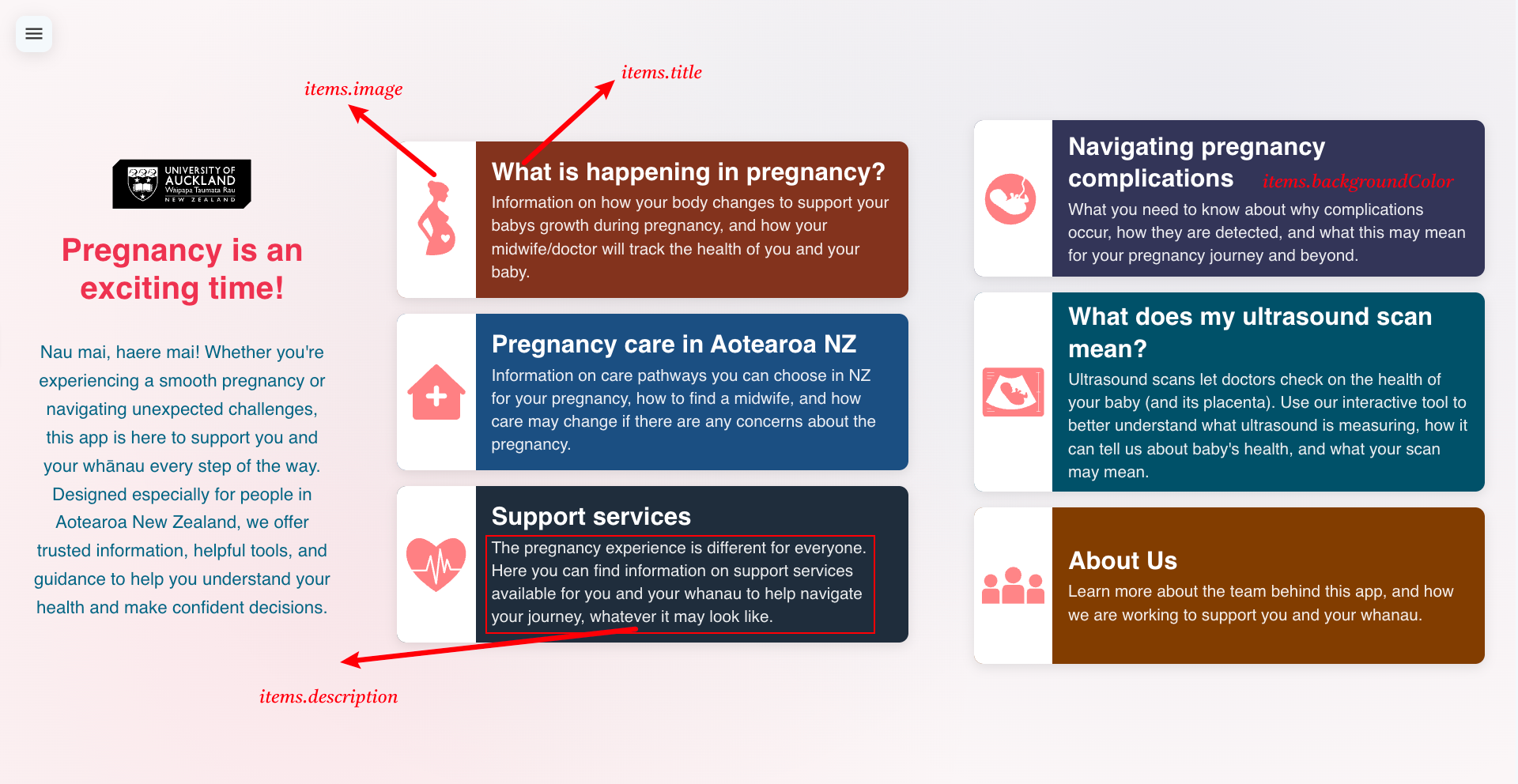
index: the index of the item, used to sort the items (from left to right, from top to bottom)
title: the title of the card item
description: the description of the card item
image: the image at the left side of the card, store the image under frontend/static/ and add the path here, you can use an icon instead of an image, just add the mdi icon name here.
backgroundColor: the background color of the item
link: define the page to navigate to when the item is clicked
See the image below for the landing page configuration and the elements on the page:
Support Services Configuration
The supportData.json file drives the Support Services page (rendered by frontend/components/content/Support.vue).
Location: frontend/assets/data/supportData.json
Schema overview
regions: List of region names shown in the region selector.
regionalServices: Map of region → list of services available in that region. - Key must match exactly one of the items in regions. - Each value is a list of strings (service names) displayed when a region is selected. - If a region has no entry, a sensible default list is shown in the UI.
Example
The following illustrates a minimal but complete configuration:
{
  "regions": [
    "Auckland",
    "Canterbury",
    "Waikato"
  ],
  "regionalServices": {
    "Auckland": [
      "Auckland City Hospital Maternity Services",
      "National Women's Health - Auckland City Hospital"
    ],
    "Canterbury": [
      "Christchurch Women's Hospital",
      "Pegasus Health Maternity Services"
    ]
  },
  "serviceSections": [
    {
      "key": "general",
      "icon": "mdi-account-group",
      "color": "success",
      "title": "For Everyone Pregnant",
      "description": "Services that help you navigate pregnancy and connect with appropriate care:",
      "regional": true
    },
    {
      "key": "specialist",
      "icon": "mdi-medical-bag",
      "color": "warning",
      "title": "Specialist Support Services",
      "items": [
        {
          "icon": "mdi-brain",
          "color": "accent",
          "title": "Mental Health Support Services",
          "description": "Specialized mental health support during pregnancy:",
          "list": [
            "Perinatal mental health services",
            "Counselling and therapy services"
          ]
        }
      ]
    },
    {
      "key": "resources",
      "icon": "mdi-book-open-variant",
      "color": "accent",
      "title": "Additional Resources & Contacts",
      "resources": [
        {
          "icon": "mdi-phone",
          "color": "primary",
          "title": "Emergency Contacts",
          "subtitle": "24/7 support services",
          "content": [
            { "label": "Emergency", "value": "111" },
            { "label": "Healthline", "value": "0800 611 116" }
          ]
        }
      ]
    }
  ]
}
Notes
Icons use Material Design Icons (e.g., mdi-account-group).
Colors may use Vuetify theme names (e.g., primary, success, warning) or project CSS variables.
To add a region, update regions and optionally add a matching entry in regionalServices. Missing regions fall back to default items in the UI.
The Support Services page route is defined via page data at frontend/pages/_slug/pageData/json/support-services.json, which references the Support component.
2.2. Styling Assets
frontend/assets/sass/
├── global.scss           # Global styles
├── base.scss             # Base styles
├── variables.scss        # Theme variables
├── _mixins.scss         # Reusable mixins
├── components/           # Component styles
└── pages/                # Page styles
2.3. Image Assets
frontend/assets/images/
├── gestures-icons.png    # UI icons
├── medtechcore-abi-logo.png
├── headshots.png         # Team photos
├── funding-abi-medtech.png
├── Annie-Jones.png      # Team member
└── Liz-Broadbent.png    # Team member